“The material has already been purchased.” “It isn’t in the warehouse.” These two statements can both be true. The procurement specialist sees a paid order, the warehouse clerk sees the actual receipt, while production hears only the word “purchased” and expects to receive the material today. To sort things out, employees open different files, compare names, and clarify dates through correspondence.
Separate spreadsheets are not inherently a problem: procurement and warehouse accounting have different objectives. The problem begins when there is no consistent connection or agreed rules between them. Then every need has to be identified again at the next stage of the process.
View the “Request Management” solution
One material — different answers
Below is a hypothetical example, not data from a specific company. It shows why the same name does not necessarily mean the same record content.
| In the procurement spreadsheet | In the warehouse spreadsheet | What needs to be clarified |
|---|---|---|
| 100 units ordered | 60 units received | Is this a partial delivery or a shortage? When is the remainder expected? |
| Fasteners, 10 packs | Fasteners, 500 pieces | Do the item and packaging match? How should the quantity be recalculated? |
| Delivery date — Friday | Receipt not recorded | Is the shipment still in transit, being unloaded, or awaiting inspection? |
| Request closed after shipment | Part of the batch not accepted | Who continues working on the discrepancy, and what did the requester receive? |
If the connection between records has to be established manually each time, the answers depend on the availability of a particular procurement specialist or warehouse clerk. The absence of one employee turns a routine clarification into a search through emails, invoices, and file copies.
Where the data diverges
Different units and designations. Procurement copies the name from the supplier’s quotation, the warehouse uses an internal designation, and the department uses a familiar abbreviation. Without a shared reference directory, duplicates and matching errors arise. Even a matching name does not rule out differences in specifications or packaging.
Statuses describe different events. For procurement, “completed” may mean that an order was placed or shipped. For the warehouse, it means that receiving is complete. If the meaning of a status is not defined, a green row in one file creates a false impression among others that the work is finished.
Changes have to be transferred manually. The supplier changed the composition of the batch, the requester adjusted the quantity, or the warehouse found a discrepancy. The information appeared in one spreadsheet but did not reach the other. The problem is not how often the file is saved, but the lack of a clear procedure for passing on changes.
There is no common point of reference. One file is maintained by invoices, another by receipts, and a third by department requirements. One request may be purchased in several batches, while one invoice may cover several requirements. Simply matching the name and amount is not enough to establish a reliable connection.
What the company loses through manual reconciliation
Duplicate purchasing
The requester does not see that their requirement is already being processed and submits it again. Without checking linked records, procurement may mistake a duplicate for a new requirement.
Unexpected shortage
The quantity ordered is treated as available. Production plans an operation, but part of the batch has not yet arrived or passed receiving.
Lengthy handover
A new assignee receives files without context: it is unclear which requirement the receipt relates to and which arrangements remain open.
An argument instead of a solution
Each department has a document supporting its position. Time is spent determining which spreadsheet is more accurate, even though the records describe different events.
It is useful to assess the problem through specific discrepancies: how many operations required manual reconciliation, which requirements were purchased twice, and for which deliveries it was impossible to quickly determine the remaining obligations. This provides a basis for changing the process without inventing savings percentages.
View the “Request Management” solution
Agree on the rules first, then combine the work
Moving two files into one large spreadsheet does not by itself eliminate contradictions. Shared designations and links between events are needed, along with people responsible for keeping each type of data up to date.
- Define the original requirement. It should be clear which department needs the material, for what purpose, and in what quantity.
- Separate ordered, received, and available quantities. These quantities may differ; one must not silently replace another.
- Agree on when the work is complete. Define which event closes the request and how to account for a partial delivery or a discrepancy during receiving.
- Establish how changes are handed over. Who updates the information, who checks it, and how does the next department learn about the situation?
A shared system does not require every employee to edit everything. It should give participants a consistent view within the scope of their tasks and permissions.
A shared request as a point of interaction in OpenBox
In the “Request Management” solution, a department’s requirement is recorded in a shared register. The record specifies the requester, department, required items, quantities, and units of measurement. Procurement adds the assignee, status, and information about purchasing and delivery. Employee access is configured according to their roles.
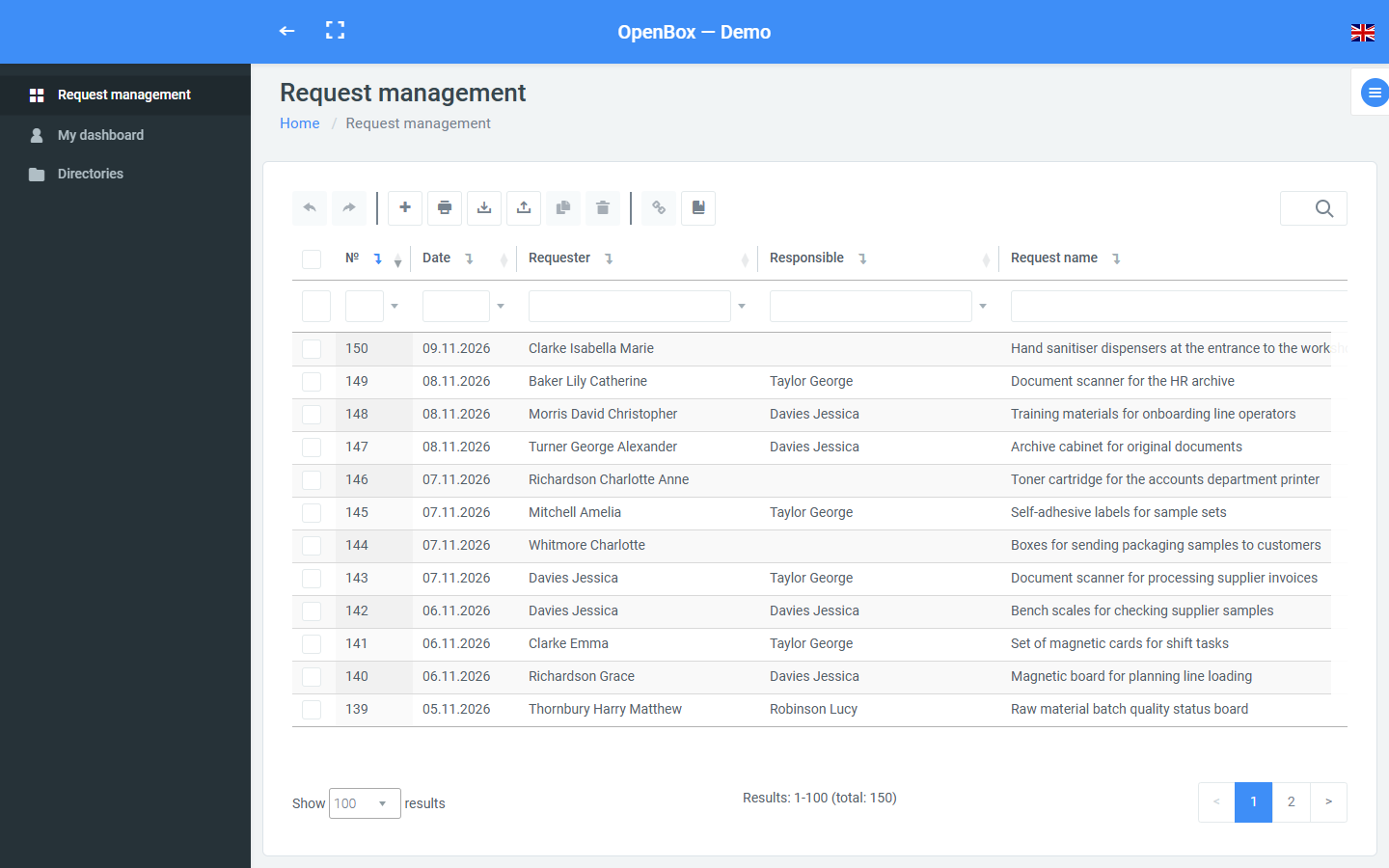
For the procurement specialist, this makes it possible to manage the work from the original request while keeping the supplier, invoice number, amount, delivery location, and delivery date alongside it. For the requester, it provides an opportunity to check the recorded status without searching through correspondence. For the manager, it provides a shared list from which the necessary records can be selected and exported.
Warehouse accounting requires the next level of connection: receipts, stock balances, issues, and transfers. The solution page provides a “Requests + Warehouse” option. Its configuration and interaction workflow should be discussed in relation to your operations, especially partial receipts, units of measurement, discrepancies, and the conditions for closing a requirement.
The basic request register should not be treated as automatic synchronization of warehouse balances. The presence of procurement information does not mean that the receipt has been recorded, the quantity is available for issue, or the balance has been calculated. These operations must be provided for in the selected solution configuration and tested using company examples.
Where to start when moving away from separate files
Take one recent purchase and trace its path from the department’s requirement to receipt of the material. Choose a case involving a partial delivery or a quantity adjustment: gaps between spreadsheets are especially visible in such a case. Determine which information should be stored together, what actions each participant performs, and where re-entry becomes necessary.
This kind of example makes it easier to evaluate the software than a general wish to “combine Excel.” On the “Request Management” solution page, you can explore the interface, the capabilities of the basic option and the warehouse option, and then proceed to a demo. Conditions not shown in the demonstration should be agreed separately before implementation.