Order in requests.
From need to delivery.
OpenBox helps collect requests from all departments in one program, organize procurement and monitor completion.
Raw materials, packaging, components and tools — see who requested them, who is purchasing them and where they should be delivered.
Problems resolved by implementing OpenBox
Requests get lost
Requests arrive by phone, messenger and on paper. In OpenBox, every request becomes a record in the shared register.
It is unclear who is responsible
Each request has a requester and an assignee. The procurement department can see which requests have not yet been taken into work.
The status has to be checked
Instead of calling the procurement specialist, an employee opens the register and checks the current status of their request.
There is not enough data for procurement
The name, quantity, unit of measurement and note help communicate the department’s needs more accurately.
Delivery has not been coordinated
The site, delivery address, driver and delivery date are collected next to the request. There is no need to search for details in correspondence.
Invoices are stored separately
The counterparty, invoice number and amount are linked to the request. Search and filters help quickly find the required procurement record.
Benefits of the OpenBox service
All departments together
A single register of needs for manufacturing, warehousing, quality control, IT and other departments.
Convenient table
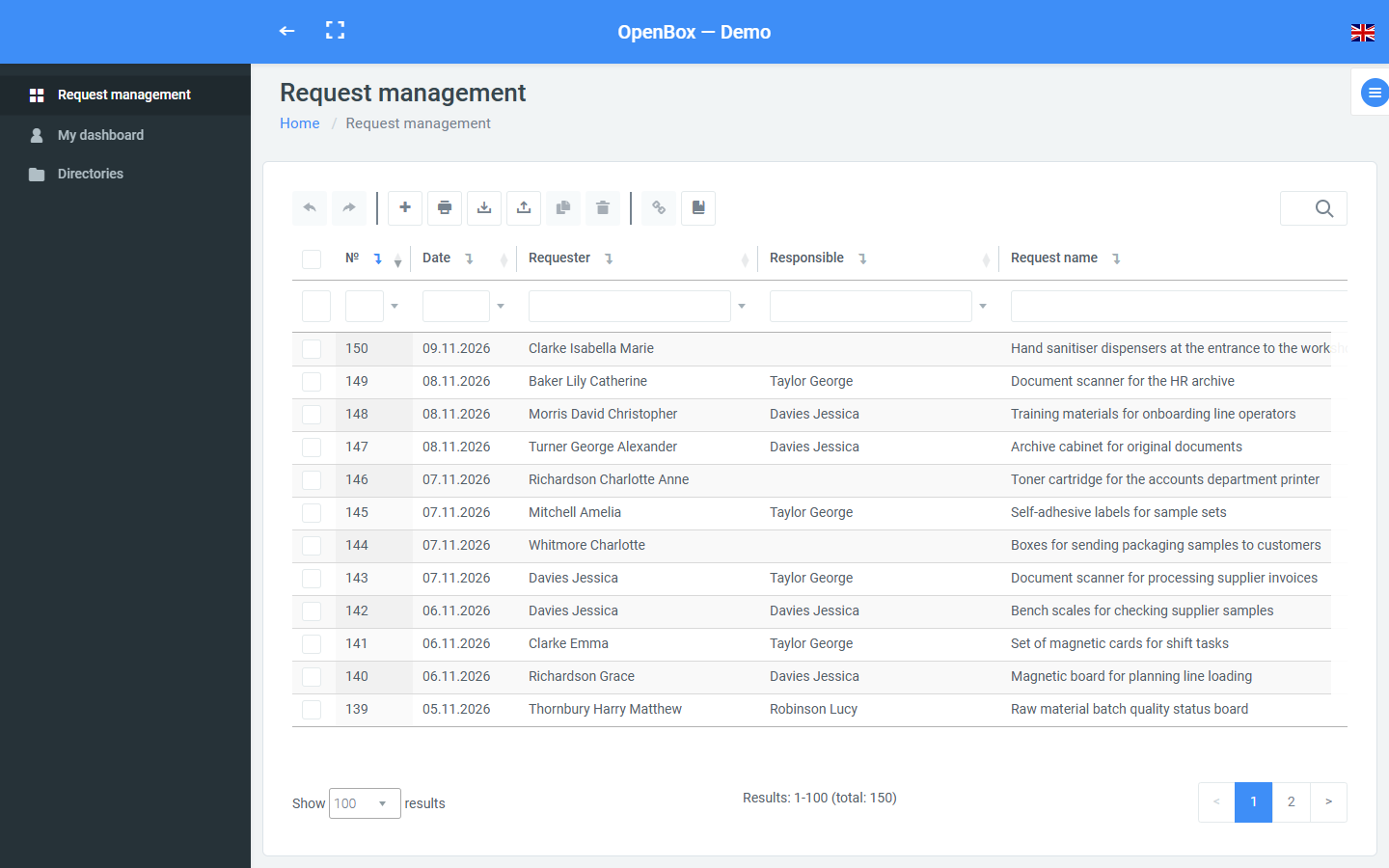
Column filters, general search and sorting for daily work.
Table or form
Edit data in cells or open a separate request card.
Access configuration
Determine which records are available to each employee.
Less repeated data entry
Copy similar requests and merge records when necessary.
Data export
Export the entire selection with the applied filters.
Work in a browser
Open the program at the portal address without installing an application on every PC.
For your company
We configure directories, permissions and the workflow to suit the enterprise’s tasks.
Program interface
Requests, responsible employees, statuses and delivery details — in one workspace.
How to work in the program
1. Create a request
Select the requester and department. Specify the required products, quantities and units of measurement.
2. Clarify the need
Add a note and delivery location so the procurement specialist understands the department’s requirements.
3. Assign an assignee
The procurement employee takes the request into work. The responsible person is visible in the register.
4. Specify the procurement
Select the counterparty, enter the invoice number and amount, and update the status.
5. Organize delivery
Specify the driver, location and delivery date. Check the details before dispatch.
6. Complete the request
After completion, change the status. The information will remain in the register for searching and analysis.
Video guide
Creating a new request: from completing the form to the record appearing in the register.
Implementation stages
Reviewing your work
We discuss how departments submit requests and how procurement fulfills them. We identify the participants, required fields and access rules.
We agree on the procedure for working with requests and the criteria for the program’s readiness for launch.
Configuring the solution
We populate the directories for the company, departments and employees. We configure permissions and test the process using your examples. We agree on any necessary customizations separately.
We conduct a trial procurement process from request creation through delivery and verify the settings.
Launching and providing support
We show employees how to create and process requests. We check the first operations, collect questions and help them learn the program.
We help resolve user questions and adjust the settings based on the results of the work.
Effects of implementing OpenBox
Let’s discuss your manufacturing tasks
Plans
BasicSubscription fee25 $per month
- Requests from departments
- Assignees and statuses
- Suppliers, invoices and amounts
- Delivery planning
- Search, filters and export
- Access rights configuration
For your companySubscription feefrom 50 $per month
- Requests from departments
- Assignees and statuses
- Suppliers, invoices and amounts
- Delivery planning
- Search, filters and export
- Access rights configuration
- Receipt and inventory of materials
- Issuance and movement of materials
- Additional fields and processes
- Integrations and additional modules
Initial setup and disk storage are charged separately and are not included in the subscription fee. All prices are in US dollars.
Frequently asked questions
Who is the program intended for?
For manufacturing companies whose departments submit requests for raw materials, materials, components, equipment and consumable goods.
Can we try it before purchasing?
Yes. Open the demo using the button on the page. In demo mode, you can try working with requests; after the page is refreshed, the original data will be restored.
Can access to requests be restricted?
Yes. Access rights are configured for employees. Visibility rules are determined during implementation based on the company’s structure.
Do we need to install the program on computers?
Users work in a browser. An access portal address and an account are required to log in.
Can data be exported?
Yes. The table supports exporting a selection, including with applied filters.
Can the program be customized for our tasks?
Yes. We will discuss the fields, directories, workflow and required integrations. The scope of work and cost will be agreed upon before development begins.